


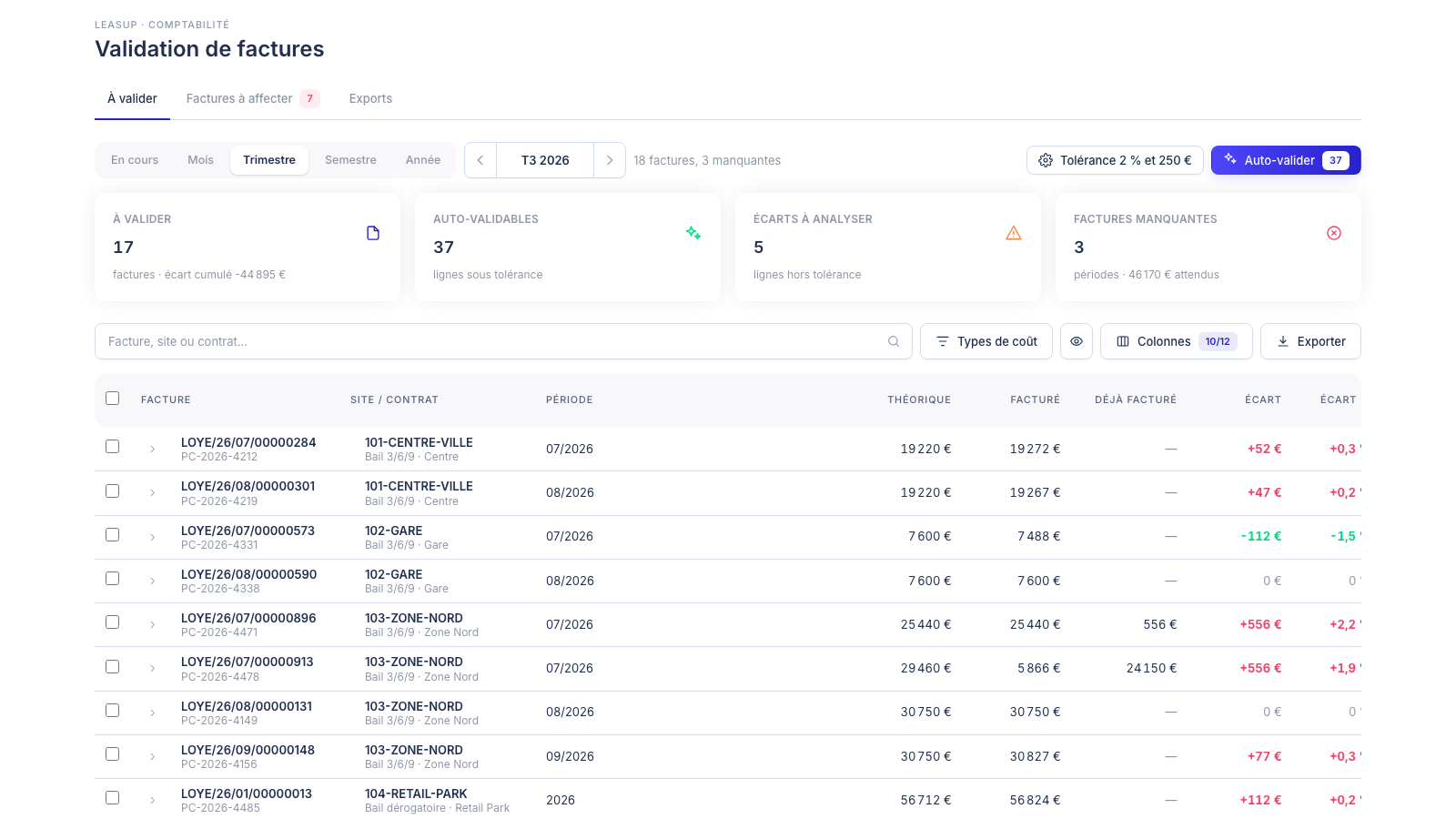
- Every invoice line is matched with the amount set out in the lease, by cost item and by period.
- An auto-approval tolerance, set per brand and country, keeps your teams focused on real variances.
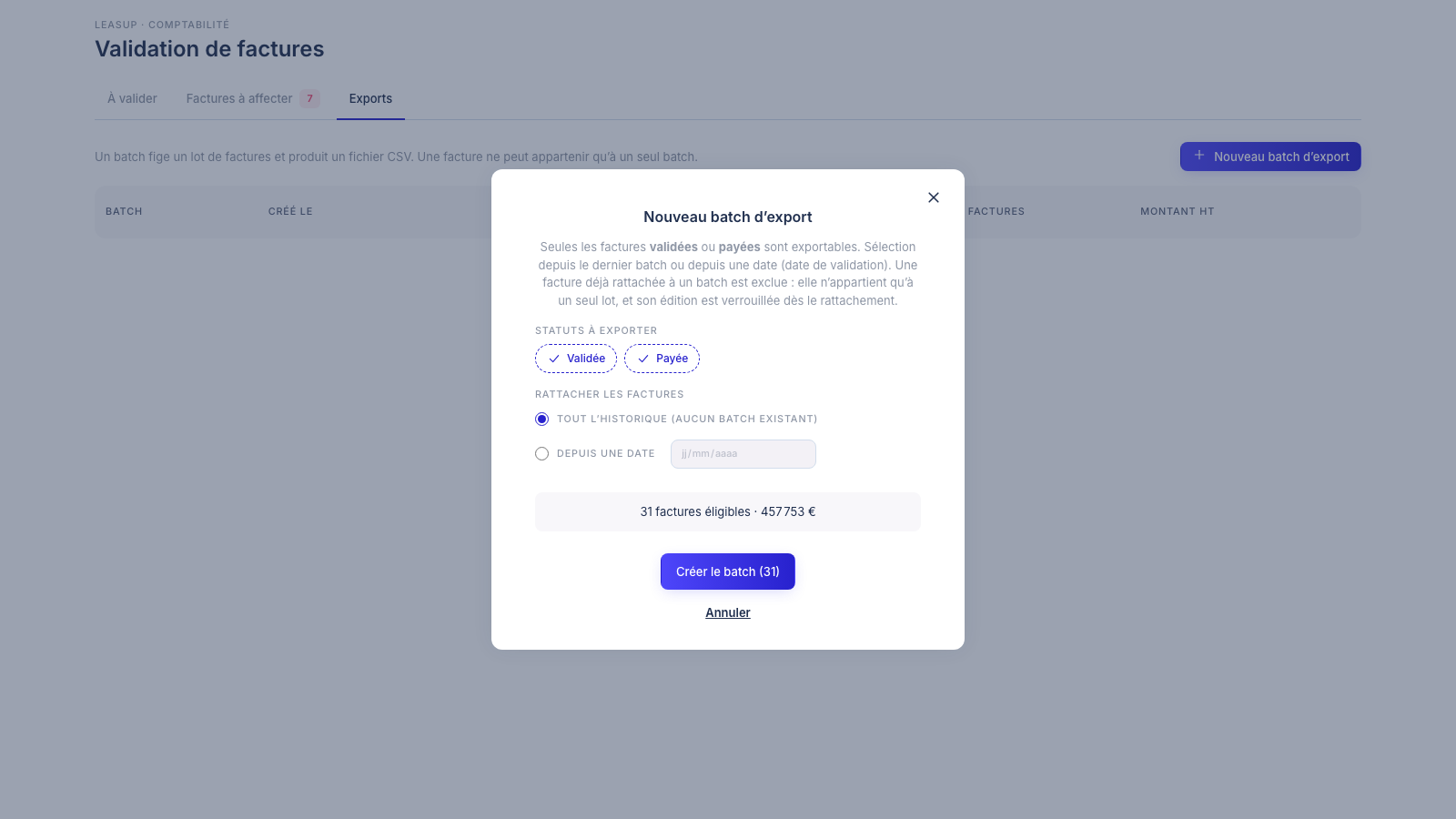
- Approved invoices go to accounting in locked batches, as a CSV file.
Every month and every quarter, the real estate and finance teams of retail brands receive dozens, sometimes hundreds, of landlord invoices: rent, service charges, taxes, deposits, fees. Before paying, they need to check that each one matches what the lease says. In practice, this is often done by hand in spreadsheets, and variances slip through the net.
Leasup is adding a new module, Invoice validation, which automatically matches each invoice against the expected amounts calculated from your leases, and supports your teams from the first check right through to handing over to accounting.
Three variances that go unnoticed
A billing error can come from three directions at once:
- The amount is wrong: indexation not applied, an unexpected service charge reconciliation, a recalculated tax.
- The invoice never arrives: the costliest variance, because an invoice you never received does not flag itself.
- The invoice is not linked to any lease: it then escapes every check.
Comparing an invoice with a lease as a whole is not enough: correct rent can hide incorrect service charges. Checks only make sense at the right level of detail.
Line-by-line reconciliation
Leasup matches each invoice line with the amount expected under the lease, by cost item (rent, service charges, property tax, fees…) and by period. For every line you see the expected amount, the invoiced amount, what has already been invoiced on other invoices, the variance and its percentage.
Example: a quarter's rent is expected at €24,150 and has already been invoiced. The landlord then sends a second invoice for €556 for indexation. Leasup takes the first invoice into account and shows a +€556 variance to review.
You can browse by month, quarter, half-year or year. Four indicators summarise the period and double as quick filters: invoices to approve, lines that can be auto-approved, variances to review and missing invoices.
Approve what matches, focus on the variances
You set a tolerance, as a percentage and an amount, for each brand and country. Lines whose variance stays within it can be auto-approved in one click, so your teams only spend time on the variances that deserve it.
- Approval works by line, by invoice or in bulk, and can be picked up later without losing work already done.
- A contested line is put in dispute, with a comment that adds to the history of exchanges. A dispute can be reversed.
- Every approval is tracked: who approved it, and when.
Nothing slips through
When a lease expects an amount for the period and no invoice has been received, Leasup shows a “Missing” line with a negative variance. A catch-up view lists every missing invoice across all periods.
Invoices received without a lease are listed separately, with the detected site. You link them to the right lease straight from the table, and only the leases for that site are offered.
Send locked batches to accounting
Once invoices are approved, you create an export batch: choose the statuses to export and the period (since the last batch or since a given date). A preview shows the number of invoices and their total before the CSV file for your accounting team is created.
A batch is a commitment: the invoices it contains are locked and can belong to only one batch. Only the change to “Paid” is still allowed, and the file can be downloaded again at any time.
Who is it for, and when?
The module is designed for property managers, real estate teams and financial controllers who manage rent and service charges across a store network. It is being finalised and will be rolled out progressively to our clients, in the Accounting menu of Leasup.
Want to see how it would work for your portfolio? Book a demo with our team.
Frequently asked questions
Who can approve an invoice?
Property managers and brand or country administrators. Read-only users can view the module but cannot approve, create a batch or change the tolerance.
What happens if an invoice never arrives?
As soon as a lease expects an amount for the period and no invoice has been received, Leasup shows a “Missing” line with a negative variance. A catch-up view lists them all, across every period.
Can an exported batch still be changed?
No. Invoices in a batch are locked: amounts, periods and lease links can no longer change. Only the change to “Paid” is still allowed, and the file can be downloaded again at any time.
